


Koofr Gift Cards Explained
Everything you need to know about Koofr gift cards — how to buy them, how to redeem them, what happens if you already have a paid plan, and how to send one as a gift. Plus, gift cards never expire, and you can choose from different designs.
Written by human for humans
Whether you want to extend your own storage plan, stock up for later, or give someone a genuinely useful present — Koofr gift cards make it simple.
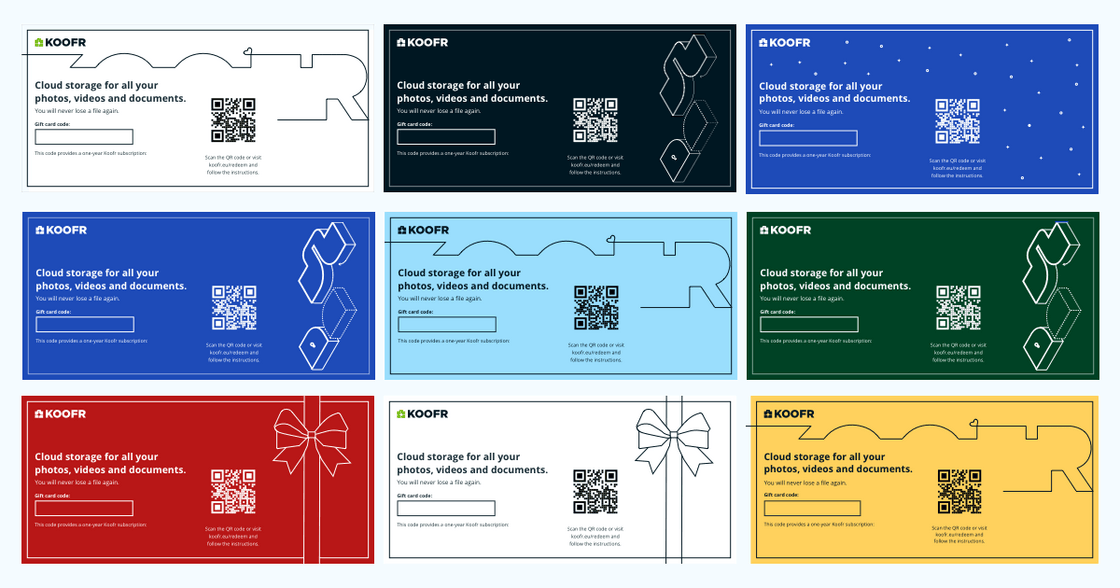
Koofr gift cards are a flexible way to pay for cloud storage on your own terms. You can use them to extend or upgrade your own subscription, or pass one on to a friend or family member as a thoughtful, clutter-free gift. Pick from a range of different designs and colours for the downloadable PDF — a small touch that makes it feel a little more personal.
- How to Buy a Gift Card
- How to Redeem a Gift Card
- Already on a Paid Plan? Here is What Happens
- Giving a Gift Card to Someone Else
- General Questions About Koofr Gift Cards
How to Buy a Koofr Gift Card
Purchasing a Koofr gift card takes just a few steps:
- Open the Koofr web app and log in to your account.
- Click on your profile picture in the upper right corner to open the Account menu.
- Select Gift Cards.
- Choose the storage plan.
- Enter your billing information and click Next.
- Complete the purchase.
Once purchased, you will receive a gift card code that you can either redeem on your own account or share with someone else.
Buying a discounted gift card with a promo code
You can take advantage of Koofr's special offers by entering a valid discount code at checkout. The process is the same as above — the only extra step is entering your discount code in the Discount Code text field in step 5, before clicking Apply. This works for gift cards on plans of 100 GB or larger.
For full instructions, see the Koofr help article: How can I purchase a discounted gift card with a code?
Handy to know: The banner at the top of the Gift Cards section shows how many unredeemed cards you currently have.
How to Redeem a Gift Card
There are a few scenarios depending on how and when you received the card.
If someone gave you a gift card
- Go to How to activate your gift card page and follow the steps or open the Koofr web app, go to the Account menu, and click Gift Cards.
- Enter the gift card code into the field.
- Done - your plan is activated straight away.
If you purchased a gift card and want to redeem it immediately
Right after the purchase, simply click Redeem to my account and follow the prompts.
If you purchased a gift card some time ago
- Log in to the Koofr web app.
- Go to the Gift Cards section via the Account menu and click the banner that says You have X unredeemed gift cards.
- Scroll down to Purchased cards — here you will find all your cards, both redeemed and unredeemed.
- Find the card you want and click Redeem to my account or Download as PDF.
- Re-enter your password to confirm.
Need a step-by-step walkthrough? See our guide: How do I activate a Koofr gift card?
Who can redeem a gift card?
Koofr gift cards can be redeemed on a free or yearly Koofr account, including the one you used to purchase them. This means you are free to buy a card and use it yourself, or pass the code along to someone else.
Full details here: Who can redeem a purchased gift card?
Already on a Paid Plan? Here is What Happens
If you already have an active yearly plan, gift cards still work, but it is worth understanding exactly what they do in each situation.
Extending your current plan with a card of the same tier
Redeeming a gift card for the same plan you are already on will extend the duration of your plan by one year - it will not add extra storage. For example, if your plan runs until February 2027 and you redeem a matching card, it will now run until February 2028.
More details: I have a paid plan, and I would like to renew my existing subscription using a discounted gift card
Upgrading to a higher-tier plan with a gift card
If you want more storage and purchase a gift card for a larger plan, you can upgrade using that card. The remaining unused value of your current plan is proportionally converted into additional duration on the new plan.
For example: if you activated a 100 GB plan (worth €12) on 1 June and redeem a 1 TB gift card on 1 December, you have used half the year — meaning €6 remains. That €6 is carried over and adds proportional extra time to your new 1 TB subscription.
Full calculation example: I have a paid plan that I would like to upgrade using a gift card
Trying to add a lower-tier card to a higher-tier plan
This is not possible. If you are on a 1 TB plan, you cannot apply a 100 GB gift card to it. Gift cards can only extend or upgrade — not downgrade.
More information: I have a paid plan and I would like to add a lower-tier gift card to it
Stacking multiple gift cards
You can redeem more than one gift card, and they stack in terms of duration, not storage space. Redeeming two 1 TB gift cards, for example, gives you the 1 TB plan for two years — not 2 TB.
Full details: I would like to add more than one gift card
Giving a Gift Card to Someone Else
Koofr gift cards make a practical, thoughtful present for anyone who values privacy, wants to keep their files organised, or is simply running out of space. There is no wrapping paper required, no guessing whether the size is right, and it is something the recipient will actually use.
Right after purchase:
- After completing your purchase, click Gift to someone else instead of redeeming it yourself.
- Choose your preferred design and colour for the gift card. There are several options to suit different occasions and tastes.
- Download and share it with the recipient however you like — by email, message, or even printed out.
If you purchased a card some time ago:
- Go to Gift Cards via the Account menu.
- Scroll to Purchased cards and find the card you want to gift.
- Click Download as PDF.
- Re-enter your password, then download in your preferred design.
The recipient can then read How to activate your gift card or go straight to redeeming the code in the Koofr web app.
Read more about gifting Koofr storage: Koofr gift card: The Perfect Gift for Your Loved Ones
General Questions About Koofr Gift Cards
Do gift cards expire?
No. Once purchased, a Koofr gift card is valid indefinitely — there is no expiration date. You can buy one now and redeem it whenever the time is right.
How many gift cards can I buy?
There is no limit. You can purchase as many gift cards as you like — useful if you want to stock up during a promotion and use them later.
Are gift card purchases counted towards the Loyalty Discount?
No, gift card purchases do not count towards Koofr's Loyalty Discount. The loyalty programme applies to direct plan purchases made year on year.
Can I buy a Koofr gift card with cryptocurrency?
Yes. Through Koofr's partnership with ProxyStore, you can purchase Koofr gift cards using cryptocurrencies such as Bitcoin and Ethereum.
For more details, see: Buy Koofr Gift Cards with Cryptocurrency
Koofr gift cards are one of the most flexible ways to manage your cloud storage subscription — whether you are planning ahead for yourself or looking for a useful present for someone else. No expiry date, no complicated process, and now with a choice of designs when gifting.
Want to talk to us? Join our growing Reddit community!